github: fatal: Authentication failed for
Seeing this?
github: fatal: Authentication failed for
Renew the github token: Github Login -> Settings -> Developer Settings -> Personal Access Tokens
Expired today.
Use the new token!
Cheers,


Seeing this?
github: fatal: Authentication failed for
Renew the github token: Github Login -> Settings -> Developer Settings -> Personal Access Tokens
Expired today.
Use the new token!
Cheers,
If you're looking:
cat ~/.vimrc
" Enable plugins
filetype plugin on
" Enable indentation
filetype indent on
" Turn syntax highlighting off. (In case there's inefficient contract between available colors.)
syntax off
" Set line numbering
set number
What about VI? For vi, the above will also work however this is manged by the cat ~/.virc file:
cat ~/.vimrc
" Enable plugins
filetype plugin on
" Enable indentation
filetype indent on
" Turn syntax highlighting off. (In case there's inefficient contract between available colors.)
syntax off
" Set line numbering
set number
Cheers,
Getting this?
[root@psql04 ~]# tail -f /data/patroni/log/postgresql-Wed.log
2022-03-09 20:07:40.890 EST [27627] FATAL: could not connect to the primary server: server closed the connection unexpectedly
This probably means the server terminated abnormally
before or while processing the request.
^C
[root@psql04 ~]#
Check on the targe primary cluster that it is not getting blocked via Haproxy:
[root@psql07 patroni]# tail -f /var/log/audit/audit.log|grep -Ei denied
type=AVC msg=audit(1646874430.882:1393): avc: denied { name_connect } for pid=1045 comm="haproxy" dest=5432 scontext=system_u:system_r:haproxy_t:s0 tcontext=system_u:object_r:postgresql_port_t:s0 tclass=tcp_socket permissive=0
Both logs should scroll as the Standby Cluster tries to make a connection to the Primary Cluster. Resolve using:
grep AVC /var/log/audit/audit.log* |grep -Ei denied >/var/log/audit/audit.previous; cat /var/log/audit/audit.previous | audit2allow -M systemd-allow; semodule -i systemd-allow.pp
Better yet, allow all haproxy traffic:
semanage permissive -a haproxy_t
As soon as this is set, Haproxy connections work perfectly and all of a sudden, the Patroni cluster is able to replicate just fine:
[root@psql04 ~]# tail -f /data/patroni/log/postgresql-Wed.log
before or while processing the request.
2022-03-09 20:28:01.807 EST [30690] FATAL: could not connect to the primary server: server closed the connection unexpectedly
This probably means the server terminated abnormally
before or while processing the request.
2022-03-09 20:28:06.816 EST [30703] LOG: fetching timeline history file for timeline 1226 from primary server
2022-03-09 20:28:06.838 EST [30703] LOG: started streaming WAL from primary at 32/55000000 on timeline 1225
2022-03-09 20:28:06.854 EST [30703] LOG: replication terminated by primary server
2022-03-09 20:28:06.854 EST [30703] DETAIL: End of WAL reached on timeline 1225 at 32/5508DE08.
2022-03-09 20:28:06.857 EST [27428] LOG: new target timeline is 1226
2022-03-09 20:28:06.859 EST [30703] LOG: restarted WAL streaming at 32/55000000 on timeline 1226
^C
[root@psql04 ~]# patronictl –config-file=/etc/patroni.yml list
+————-+——————–+—————-+———+——+———–+—————–+
| Member | Host | Role | State | TL | Lag in MB | Pending restart |
+ Cluster: postgres (6617627977882355208) ———-+———+——+———–+—————–+
| postgresql0 | psql04.nix.mds.xyz | Standby Leader | running | 1226 | | * |
| postgresql1 | psql05.nix.mds.xyz | Replica | running | 1226 | 0 | * |
| postgresql2 | psql06.nix.mds.xyz | Replica | running | 1226 | 0 | * |
+————-+——————–+—————-+———+——+———–+—————–+
[root@psql04 ~]#
Cheers,
Not getting a cluster initialized when using patroni?
[root@psql06 patroni]# systemctl status patroni
? patroni.service – Runners to orchestrate a high-availability PostgreSQL
Loaded: loaded (/etc/systemd/system/patroni.service; enabled; vendor preset: disabled)
Active: active (running) since Sun 2022-03-06 14:08:28 EST; 2min 13s ago
Main PID: 5857 (patroni)
CGroup: /system.slice/patroni.service
??5857 /usr/bin/python3 /usr/bin/patroni /etc/patroni.yml
Mar 06 14:08:28 psql06.nix.mds.xyz systemd[1]: Started Runners to orchestrate a high-availability PostgreSQL.
[root@psql06 patroni]#
Run this command to tell the system to recreate it (assuming it's new ) in the ETCD database. :
[root@psql06 patroni]# etcdctl rm /db/postgres/initialize /db/postgres/members/postgresql0 /db/postgres/members/postgresql1 /db/postgres/members/postgresql2
PrevNode.Value: 7072040681072184024
[root@psql06 patroni]#
Otherwise, take a backup and issue the above etcd command to reinitialize it in the etcd database. You should now see the cluster initialized:
[root@psql06 patroni]# ls -altri
total 128
69165434 drwxr-xr-x. 3 root root 20 Mar 1 23:20 ..
135599427 -rw——-. 1 postgres postgres 206 Mar 6 14:13 backup_label.old
201488665 drwx——. 2 postgres postgres 6 Mar 6 14:13 pg_twophase
135599430 drwx——. 2 postgres postgres 6 Mar 6 14:13 pg_subtrans
69297824 drwx——. 2 postgres postgres 6 Mar 6 14:13 pg_snapshots
79235 drwx——. 2 postgres postgres 6 Mar 6 14:13 pg_serial
135599429 drwx——. 2 postgres postgres 6 Mar 6 14:13 pg_dynshmem
69297823 drwx——. 2 postgres postgres 6 Mar 6 14:13 pg_commit_ts
79236 drwx——. 4 postgres postgres 34 Mar 6 14:13 pg_multixact
201488666 drwx——. 5 postgres postgres 38 Mar 6 14:13 base
201488669 drwx——. 2 postgres postgres 17 Mar 6 14:13 pg_xact
490575 drwx——. 2 postgres postgres 6 Mar 6 14:13 pg_tblspc
134330472 drwx——. 2 postgres postgres 6 Mar 6 14:13 pg_stat_tmp
69062750 drwx——. 2 postgres postgres 6 Mar 6 14:13 pg_stat
201488668 drwx——. 2 postgres postgres 6 Mar 6 14:13 pg_replslot
134330475 -rw——-. 1 postgres postgres 88 Mar 6 14:13 postgresql.auto.conf
134330474 -rw——-. 1 postgres postgres 3 Mar 6 14:13 PG_VERSION
490608 drwx——. 4 postgres postgres 65 Mar 6 14:13 pg_logical
134330476 -rw——-. 1 postgres postgres 4739 Mar 6 14:13 pg_hba.conf
134330477 -rw——-. 1 postgres postgres 1636 Mar 6 14:13 pg_ident.conf
134330481 -rw——-. 1 postgres postgres 23002 Mar 6 14:13 postgresql.base.conf
201488671 drwx——. 2 postgres postgres 31 Mar 6 14:13 log
134983769 -rw——-. 1 postgres postgres 297 Mar 6 14:13 recovery.conf
134330482 -rw-r–r–. 1 postgres postgres 580 Mar 6 14:13 postgresql.conf
134983765 -rw——-. 1 postgres postgres 37 Mar 6 14:13 .s.PGSQL.5432.lock
134983771 srwxrwxrwx. 1 postgres postgres 0 Mar 6 14:13 .s.PGSQL.5432
201488664 drwx——. 2 postgres postgres 17 Mar 6 14:13 pg_notify
134983772 -rw——-. 1 postgres postgres 435 Mar 6 14:13 postmaster.opts
134983766 -rw——-. 1 postgres postgres 30 Mar 6 14:13 current_logfiles
134983770 -rw——-. 1 postgres postgres 85 Mar 6 14:13 postmaster.pid
1165873 drwx——. 2 postgres postgres 4096 Mar 6 14:13 global
134330478 -rw-r–r–. 1 postgres postgres 580 Mar 6 14:13 postgresql.conf.backup
134983767 -rw——-. 1 postgres postgres 23002 Mar 6 14:13 postgresql.base.conf.backup
134330479 -rw——-. 1 postgres postgres 4739 Mar 6 14:13 pg_hba.conf.backup
134330480 -rw——-. 1 postgres postgres 1636 Mar 6 14:13 pg_ident.conf.backup
134330484 -rw——-. 1 postgres postgres 124 Mar 6 14:13 patroni.dynamic.json
135582283 drwx——. 20 postgres postgres 4096 Mar 6 14:13 .
135599426 drwx——. 3 postgres postgres 4096 Mar 6 14:13 pg_wal
[root@psql06 patroni]#
And now you should see a healthy cluster:
[root@psql04 patroni]# patronictl –config-file=/etc/patroni.yml list
+————-+——————–+———+———+—-+———–+
| Member | Host | Role | State | TL | Lag in MB |
+ Cluster: postgres (7072067282323834615) —+———+—-+———–+
| postgresql0 | psql04.nix.mds.xyz | Replica | running | 1 | 0 |
| postgresql1 | psql05.nix.mds.xyz | Leader | running | 1 | |
| postgresql2 | psql06.nix.mds.xyz | Replica | running | 1 | 0 |
+————-+——————–+———+———+—-+———–+
[root@psql04 patroni]#
HF!
Cheers,
Getting this?
[root@psql06 log]# ls -altri
total 12
69297428 drwx——. 2 postgres postgres 31 Mar 6 12:29 .
69297429 -rw——-. 1 postgres postgres 7245 Mar 6 12:37 postgresql-Sun.log
135582283 drwx——. 20 postgres postgres 4096 Mar 6 12:37 ..
[root@psql06 log]# cat postgresql-Sun.log
2022-03-06 12:29:47.467 EST [15085] LOG: specifying both host name and CIDR mask is invalid: "psql04.nix.mds.xyz/0"
2022-03-06 12:29:47.467 EST [15085] CONTEXT: line 96 of configuration file "/data/patroni/pg_hba.conf"
It means exactly what it says:
[root@psql06 patroni]# cat /etc/patroni.yml
scope: postgres
namespace: /db/
name: postgresql2
log:
level: DEBUG
dir: /var/log/patroni/
file_num: 37
file_size: 52428800
restapi:
listen: psql06.nix.mds.xyz:8008
connect_address: psql06.nix.mds.xyz:8008
etcd:
host: psql06.nix.mds.xyz:2379
bootstrap:
dcs:
ttl: 30
loop_wait: 10
retry_timeout: 10
maximum_lag_on_failover: 1048576
postgresql:
use_pg_rewind: true
initdb:
– encoding: UTF8
– data-checksums
pg_hba:
– host replication replicator 127.0.0.1/32 md5
– host replication replicator psql04.nix.mds.xyz/0 md5
– host replication replicator psql05.nix.mds.xyz/0 md5
– host replication replicator psql06.nix.mds.xyz/0 md5
– host all all 0.0.0.0/0 md5
users:
admin:
password: admin
options:
– createrole
– createdb
postgresql:
listen: psql06.nix.mds.xyz:5432
bin_dir: /usr/pgsql-10/bin
connect_address: psql06.nix.mds.xyz:5432
data_dir: /data/patroni
pgpass: /tmp/pgpass
unix_socket_directories: /data/patroni
authentication:
replication:
username: replicator
password: some-rep-pass
superuser:
username: postgres
password: somepass
parameters:
unix_socket_directories: '.'
max_connections: '256'
max_replication_slots: '64'
tags:
nofailover: false
noloadbalance: false
clonefrom: false
nosync: false
[root@psql06 patroni]#
Correct syntax should be without the mask for hostnames. (For IP's it's ok):
pg_hba:
– host replication replicator 127.0.0.1/32 md5
– host replication replicator psql04.nix.mds.xyz md5
– host replication replicator psql05.nix.mds.xyz md5
– host replication replicator psql06.nix.mds.xyz md5
– host all all 0.0.0.0/0 md5
Cheers,
Getting this?
[root@psql06 ~]# systemctl status patroni
? patroni.service – Runners to orchestrate a high-availability PostgreSQL
Loaded: loaded (/etc/systemd/system/patroni.service; enabled; vendor preset: disabled)
Active: failed (Result: exit-code) since Thu 2022-03-03 01:28:53 EST; 9s ago
Process: 10292 ExecStart=/usr/local/bin/patroni /etc/patroni.yml (code=exited, status=1/FAILURE)
Main PID: 10292 (code=exited, status=1/FAILURE)
Mar 03 01:28:53 psql06.nix.mds.xyz patroni[10292]: File "/usr/local/lib/python3.6/site-packages/patroni/daemon.py", line 98, in abstract_main
Mar 03 01:28:53 psql06.nix.mds.xyz patroni[10292]: controller = cls(config)
Mar 03 01:28:53 psql06.nix.mds.xyz patroni[10292]: File "/usr/local/lib/python3.6/site-packages/patroni/__main__.py", line 25, in __init__
Mar 03 01:28:53 psql06.nix.mds.xyz patroni[10292]: self.dcs = get_dcs(self.config)
Mar 03 01:28:53 psql06.nix.mds.xyz patroni[10292]: File "/usr/local/lib/python3.6/site-packages/patroni/dcs/__init__.py", line 111, in get_dcs
Mar 03 01:28:53 psql06.nix.mds.xyz patroni[10292]: Available implementations: """ + ', '.join(sorted(set(available_implementations))))
Mar 03 01:28:53 psql06.nix.mds.xyz patroni[10292]: patroni.exceptions.PatroniFatalException: 'Can not find suitable configuration of distributed configuration store\nAv…tes, raft'
Mar 03 01:28:53 psql06.nix.mds.xyz systemd[1]: patroni.service: main process exited, code=exited, status=1/FAILURE
Mar 03 01:28:53 psql06.nix.mds.xyz systemd[1]: Unit patroni.service entered failed state.
Mar 03 01:28:53 psql06.nix.mds.xyz systemd[1]: patroni.service failed.
Hint: Some lines were ellipsized, use -l to show in full.
[root@psql06 ~]#
More precisely:
Mar 03 01:18:39 psql06.nix.mds.xyz patroni[9867]: File "/usr/local/lib/python3.6/site-packages/patroni/dcs/__init__.py", line 111, in get_dcs
Mar 03 01:18:39 psql06.nix.mds.xyz patroni[9867]: Available implementations: """ + ', '.join(sorted(set(available_implementations))))
Mar 03 01:18:39 psql06.nix.mds.xyz patroni[9867]: patroni.exceptions.PatroniFatalException: 'Can not find suitable configuration of distributed configuration store\nAvailable implementations: etcd, etcd3, kubernetes'
Mar 03 01:18:39 psql06.nix.mds.xyz systemd[1]: patroni.service: main process exited, code=exited, status=1/FAILURE
Mar 03 01:18:39 psql06.nix.mds.xyz systemd[1]: Unit patroni.service entered failed state.
Mar 03 01:18:39 psql06.nix.mds.xyz systemd[1]: patroni.service failed.
^C
[root@psql06 ~]#
Reboot the machines? Dependencies were installed but maybe did not take effect till a reboot? Turns out the .yml file was not right. When copying and pasting from documents, the formatting is often changed:
[root@psql06 ~]#
[root@psql06 ~]# python3 -c 'import yaml, sys; print(yaml.safe_load(sys.stdin))' < /etc/patroni.yml
{'postgresql': {'data_dir': '/data/patroni', 'parameters': {'unix_socket_directories': '.', 'max_replication_slots': '64', 'max_connections': '256'}, 'pgpass': '/tmp/pgpass', 'unix_socket_directories': '/data/patroni', 'authentication': {'replication': {'username': 'replicator', 'password': 'rep-pass'}, 'superuser': {'username': 'postgres', 'password': 'secretpassword'}}, 'bin_dir': '/usr/pgsql-10/bin', 'connect_address': 'psql06.nix.mds.xyz:5432', 'listen': 'psql06.nix.mds.xyz:5432'}, 'name': 'postgresql2', 'tags': {'nofailover': False, 'noloadbalance': False, 'clonefrom': False, 'nosync': False}, 'restapi': {'connect_address': 'psql06.nix.mds.xyz:8008', 'listen': 'psql06.nix.mds.xyz:8008'}, 'bootstrap': {'pg_hba': [‘host replication replicator 127.0.0.1/32 md5’, ‘host replication replicator psql04.nix.mds.xyz/0 md5’, ‘host replication replicator psql05.nix.mds.xyz/0 md5’, ‘host replication replicator psql06.nix.mds.xyz/0 md5’, ‘host all all 0.0.0.0/0 md5’], ‘users’: {‘admin’: {‘password’: ‘admin’, ‘options’: [‘createrole’, ‘createdb’]}}, ‘initdb’: [{‘encoding’: ‘UTF8’}, ‘data-checksums’], 'dcs': {'ttl': 30, 'maximum_lag_on_failover': 1048576, 'retry_timeout': 10, 'postgresql': {'use_pg_rewind': True}, 'loop_wait': 10}}, 'namespace': '/db/', 'etcd': {'host': 'psql06.nix.mds.xyz:2379'}, 'scope': 'postgres', 'log': {'level': 'DEBUG', 'file_num': 37, 'dir': '/var/log/patroni/', 'file_size': 52428800}}
[root@psql06 ~]#
In comparison to the bad backup:
[root@psql06 ~]# python3 -c 'import yaml, sys; print(yaml.safe_load(sys.stdin))' < /etc/patroni.yml-backup01
{u'\xa0 \xa0 \xa0 \xa0 maximum_lag_on_failover': 1048576, u'\xa0 \xa0 nosync': False, u'\xa0 \xa0 \xa0 \xa0 superuser': None, u'\xa0 \xa0 \xa0 \xa0 unix_socket_directories': '.', u'\xa0 \xa0 \xa0 \xa0 retry_timeout': 10, u'\xa0 \xa0 unix_socket_directories': '/data/patroni', u'\xa0 \xa0 \xa0 \xa0 ttl': 30, u'\xa0 \xa0 connect_address': '192.168.0.186:5432', u'\xa0 \xa0 \xa0 \xa0 \xa0 \xa0 use_pg_rewind': True, 'log': {'level': 'DEBUG', 'file_num': 37, 'dir': '/var/log/patroni/', 'file_size': 52428800}, u'\xa0 \xa0 bin_dir': '/usr/pgsql-10/bin', u'\xa0 \xa0 \xa0 \xa0 \xa0 \xa0 password': 'secretpassword', 'namespace': '/db/', u'\xa0 \xa0 authentication': None, u'\xa0 \xa0 nofailover': False, u'\xa0 \xa0 listen': '192.168.0.186:5432', 'etcd': None, 'restapi': None, 'scope': 'postgres', u'\xa0 \xa0 initdb': [{‘encoding’: ‘UTF8’}, ‘data-checksums’], u’\xa0 \xa0 data_dir’: ‘/data/patroni’, u’\xa0 \xa0 pgpass’: ‘/tmp/pgpass’, ‘tags’: None, u’\xa0 \xa0 users’: None, u’\xa0 \xa0 parameters’: None, u’\xa0 \xa0 \xa0 \xa0 loop_wait’: 10, u’\xa0 \xa0 noloadbalance’: False, u’\xa0 \xa0 dcs’: None, u’\xa0 \xa0 \xa0 \xa0 \xa0 \xa0 username’: ‘postgres’, u’\xa0 \xa0 host’: ‘192.168.0.186:2379′, u’\xa0 \xa0 \xa0 \xa0 admin’: None, u’\xa0 \xa0 clonefrom’: False, ‘postgresql’: None, ‘name’: ‘postgresql2′, u’\xa0 \xa0 \xa0 \xa0 \xa0 \xa0 options’: [‘createrole’, ‘createdb’], ‘bootstrap’: None, u’\xa0 \xa0 \xa0 \xa0 replication’: None, u’\xa0 \xa0 pg_hba’: [‘host replication replicator 127.0.0.1/32 md5’, ‘host replication replicator 192.168.0.202/0 md5’, ‘host replication replicator 192.168.0.103/0 md5’, ‘host replication replicator 192.168.0.186/0 md5’, ‘host all all 0.0.0.0/0 md5’], u'\xa0 \xa0 \xa0 \xa0 postgresql': None}
[root@psql06 ~]#
Another variant is to also use jq to confirm file syntax:
[root@psql07 ~]# python3 -c 'import yaml, sys; print(yaml.safe_load(sys.stdin))' < /etc/patroni.yml|jq
parse error: Invalid numeric literal at line 1, column 9
[root@psql07 ~]#
Need to edit the file manually to remove the special space characters and save once more.
Cheers,
Tom
Getting this error when trying to create a RAID array on your DL380 G8?
A fatal error has occurred.

	Command: 51h

	SCSI Status: 0000h

	Command Status: 0004h
Perhaps the lack of a license on the cache module is the culprit? Or perhaps the addition of another device, such as the SSD. Reseating the Cache Module didn't do the trick either. Turns out none of these were the culprit. Download the following version ot the HP SSA:
https://support.hpe.com/hpesc/public/swd/detail?swItemId=MTX_321a88714bff4279abf175b9bd
Extract then mount the ISO via the Remote Console from iLO 4. Once mounted select option SSACLI (Second option on the list) . This will land you at the prompt. To fix the above, issue the following command from this prompt:
ctrl slot=0 modify hbamode=off
Turns out that reseating the Cache Module reset the controller to HBA mode, meaning no RAID configuration is possible in this mode. Issuing the above turns the controller's HBA mode to OFF enabling RAID creation once more.
Cheers,
Installing Entware on Asus RT-AC88U, Asus RT-AC68U or Asus RT-AC87U . Note, for this install, a USB drive is not required, however a USB drive is highly recommended. However, these steps will dip into your /jffs space, so care should be taken to install just what you need, since space in /jffs is not unlimited.
IMPORTANT: if using a USB flash storage, which is higly recommended, to have the USB drive mounted automagically on /opt, the LABEL on the disk must be set to Optware according to this howto for Entware. Please use these steps to setup a USB drive to avoid the /jffs space limitations:
[root@rfc1178-01 ~]# mkfs.ext4 -L Optware /dev/sdd
mke2fs 1.42.7 (21-Jan-2013)
/dev/sdd is entire device, not just one partition!
Proceed anyway? (y,n) y
Filesystem label=Optware
OS type: Linux
Block size=4096 (log=2)
Fragment size=4096 (log=2)
Stride=0 blocks, Stripe width=0 blocks
1880480 inodes, 7511040 blocks
375552 blocks (5.00%) reserved for the super user
First data block=0
Maximum filesystem blocks=0
230 block groups
32768 blocks per group, 32768 fragments per group
8176 inodes per group
Superblock backups stored on blocks:
32768, 98304, 163840, 229376, 294912, 819200, 884736, 1605632, 2654208,
4096000
Allocating group tables: done
Writing inode tables: done
Creating journal (32768 blocks): done
Writing superblocks and filesystem accounting information: done
[root@rfc1178-01 ~]#
[root@rfc1178-01 ~]#
[root@rfc1178-01 ~]# lsblk /dev/sdd
NAME MAJ:MIN RM SIZE RO TYPE MOUNTPOINT
sdd 8:48 1 28.7G 0 disk
[root@rfc1178-01 ~]# blkid /dev/sdd
/dev/sdd: LABEL="Optware" UUID="8ffab564-215e-4530-b00c-88813ef76122" TYPE="ext4"
[root@rfc1178-01 ~]#
If the volume is labeled correctly, it will auto mount as follows:
— /dev/sda
Block device, size 28.65 GiB (30765219840 bytes)
Ext4 file system
Volume name "Optware"
UUID 8FFAB564-215E-4530-B00C-88813EF76122 (DCE, v4)
Volume size 28.65 GiB (30765219840 bytes, 7511040 blocks of 4 KiB)
/dev/sda mounted to /opt
To start, our router model is:
CPU
CPU Model Broadcom BCM4709
CPU Cores 2
CPU Features EDSP FASTMULT HALF TLS
CPU Clock 1400 MHz
Load Average 0.08, 0.13, 0.07 %4
Temperatures CPU 78.6 °C / WL0 49.1 °C / WL1 50.0 °C
The broadcom link definining Broadcom BCM4707/4708/4709 however, has the following:
1 GHz ARM® Cortex™-A9 dual-core with a 32 KB four-way set associative instruction cache, a 32 KB four-way set associative data cache and a 128-entry translation lookaside buffer (TLB).
Clearly showing it's ARM Cortex – A9 Dual Core CPU. Status page confirms part of this above with the 2 cores. So what package do we use for installnig Entware? ARM based:
(Skip if USB storage used) mkdir /jffs/opt
(Skip if USB storage used) mount -o bind /jffs/opt /opt
cd /opt
wget http://bin.entware.net/armv7sf-k3.2/installer/generic.sh
chmod +x ./generic.sh; sh ./generic.sh
opkg update
opkg upgrade
At this point, Entware should be fully installed. Run the following to list out and search for packages:
root@DD-WRT-ROMA:/opt# opkg list | grep -Ei netcat
ncat – 7.91-3 – Much-improved reimplementation of Netcat
netcat – 0.7.1-2 – Netcat is a featured networking utility which reads and writes data across network connections, using the TCP/IP protocol. It is designed to be a reliable "back-end" tool that can be used directly or easily driven by other programs and scripts. At the same time, it is a feature-rich network debugging and exploration tool, since it can create almost any kind of connection you would need and has several interesting built-in capabilities.
root@DD-WRT-ROMA:/opt#
Additional details can be found on the DD-WRT Entware page. In case the above does NOT work, rules such as these may be required:
# ———————-
# ENTWARE – Cloud Flare Net IP Range used by: wget http://bin.entware.net/armv7sf-k3.2/Packages.gz
# ———————-
iptables -A INPUT -s 172.64.0.0/13 -d $(nvram get lan_ipaddr) -p udp –match multiport –sports 80,443 -j ACCEPT
iptables -A INPUT -s 172.64.0.0/13 -d $(nvram get lan_ipaddr) -p tcp –match multiport –sports 80,443 -j ACCEPT
iptables -A INPUT -s 172.64.0.0/13 -d $(nvram get wan_ipaddr) -p udp –match multiport –sports 80,443 -j ACCEPT
iptables -A INPUT -s 172.64.0.0/13 -d $(nvram get wan_ipaddr) -p tcp –match multiport –sports 80,443 -j ACCEPT
iptables -A INPUT -s 104.16.0.0/12 -d $(nvram get wan_ipaddr) -p udp –match multiport –sports 80,443 -j ACCEPT
iptables -A INPUT -s 104.16.0.0/12 -d $(nvram get wan_ipaddr) -p tcp –match multiport –sports 80,443 -j ACCEPT
Verify traffic using:
# tcpdump host 172.64.80.1 and port 80 -n -s 0 -vvv | tee -a tcpdump.log
Cheers,
Fast forward a few years, and after a few IoT device purchases, multiple VLAN setup with DD-WRT started to become more attractive. More importantly, a friend asked about the same so I’ve set out to do just that: setup additional VLAN’s for my own network via DD-WRT. Why would I want to do this? For the simple fact that multiple VLAN’s offer less chance of IP conflicts and on a single congested network, things tend to slow down alot in a single VLAN. This is where multiple VLAN’s come in handy.
If you wish to skip the entire tutorial, feel free to jump towards the end of the article to download the template for DD-WRT with all the configuration settings pre-set for you. Word of thought however. Going through the setup manually has the advantage of introducing the reader to the inner workings of each settings.
For this setup, we will use DD-WRT r48128, which looks to be a very stable release. The router used is the:
Asus RT-AC88U
with the Broadcom BCM4709 chip. However, given that DD-WRT’s fairly universal setup, it’s not a far stretch to think this will also work on other similar units. First, a quick disclaimer:
These settings are only for Proof Of Concept (POC) LAB setup that is NOT meant to be internet facing in anyway. The setup here requires significantly more configuration before it can be considered OR used in any environment aside from a POC LAB environment.
Before jumping in, it’s noteworthy to mention the ports to be used once the setup is complete:
| Service | IP:Port |
| SSH (Local Network) | 192.168.0.19:56565 |
| Remote GUI (HTTPS)
Only if Internet Facing. |
EXTERNAL IP:10101 |
| SSH (Remote) | EXTERNAL IP:10102 |
So now on to the setup. First, set your basic configuration as follows:
Router Name: DD-WRT-TEMPLATE
Hostname: DD-WRT-TEMPLATE
Domain Name: mds.xyz
MTU: Auto
Shortcut Forwarding Engine: SFE
STP: Disable
Router IP: Choose one. Image Sample: 192.168.0.100/24
Gateway: Choose one. Image Sample: 192.168.0.101. Typically this is X.X.X.1 .
Local DNS: Use your local DNS Server here. Image sample: 192.168.0.102
DHCP Type: We probably don’t really need the DHCP server running here but haven’t tested with this option set differently. For now, this can be selected but disabled. DHCP will be ran manually later on.
Static DNS 1-3: Fill these in with the local DNS servers available on your network. Leave blank if none.
NTP Client: Enable (If you have one)
Time Zone: Canada / Eastern
Server IP/Name: 192.168.0.123 (If you have one)
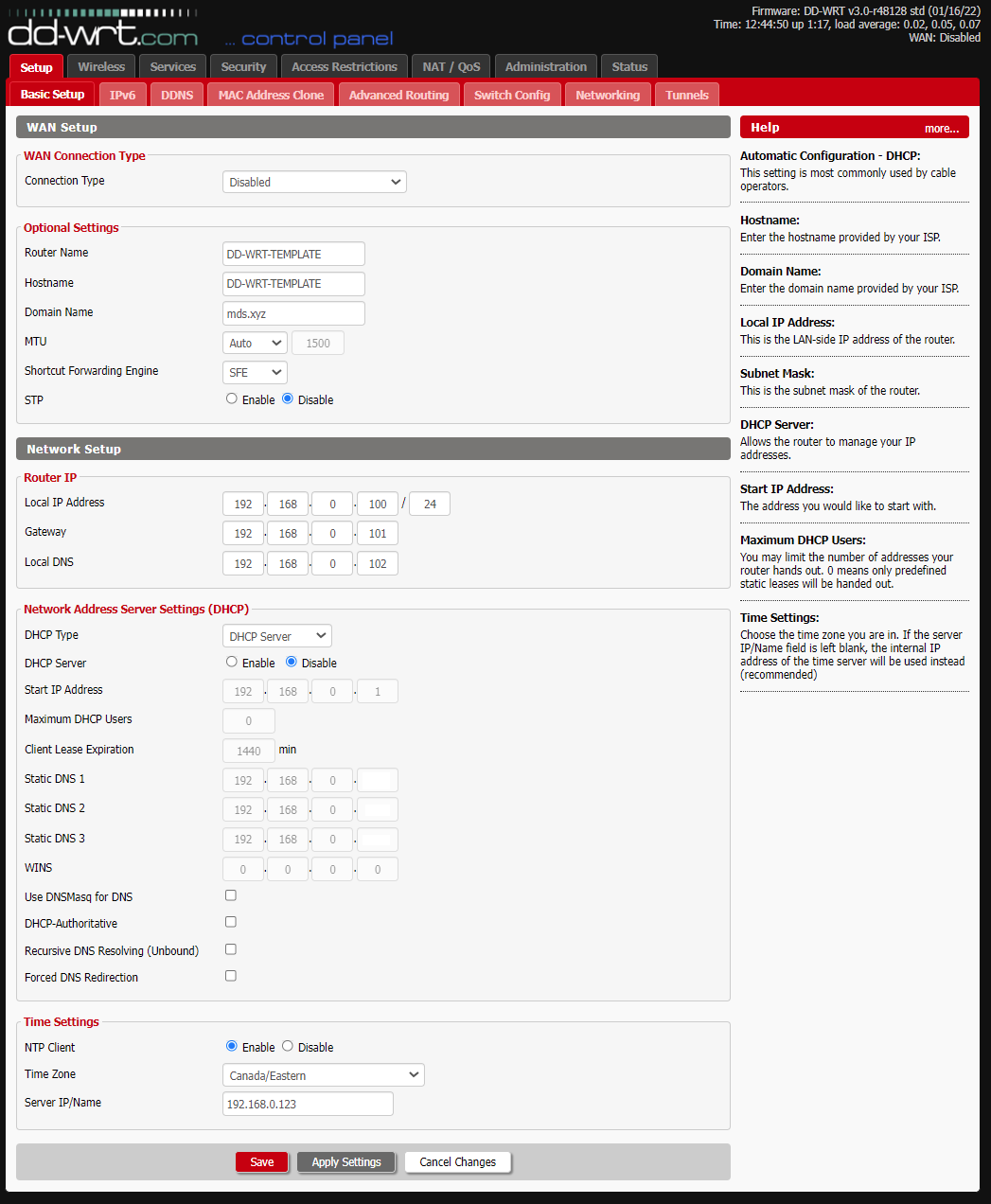
Next, let’s look at the Advanced Routing section. In this case, OSPF will be configured and used. IMPORTANT: This assumes the rest of your routers will also run OSPF, including your internet facing router. OSPF will transfer the VLAN information to the rest of your routers enabling you to access said VLAN’s anywhere in your setup.
Operating Mode: OSPF Router
OSPF Config Style: GUI
OSPF Configuration: (Paste Contents Below)
router ospf
log-adjacency-changes
ospf router-id 192.168.0.100
network 192.168.0.1/24 area 0
network 10.4.0.1/24 area 0
network 10.5.0.1/24 area 0
#
# debug ospf ism
# debug ospf lsa
# debug ospf nsm
# debug ospf nssa
# debug ospf packet all
# debug ospf sr
# debug ospf te
# debug ospf zebra
#
log file /var/log/ospf
hostname DD-WRT-TEMPLATE
Zebra Config Style: GUI
Zebra Log: Enabled

Save the config. Let’s move along ot the Switch Config. We will assign a couple of VLAN’s to various physical ports as well. If missing VLAN 3 and 4, add these in and set them accordingly for the various ports. There is no specific need to assign the ports to a different VLAN, as in the second image, however for the purpose of this demonstration, we will assign these to give our physical interfaces the capability to to access above said VLAN’s.

Example of a config that does not assign the new VLAN’s to the physical ports:

Next, define your Wireless Interfaces. In our case, we’ve defined 6. Three for 2.4Ghz and 3 for 5Ghz, each on a separate VLAN.
Wireless Mode: AP
Wireless Network Mode: Mixed
Wireless Network Name (SSID): NVLAN192168-2.4
Wireless Channel: Auto
Channel Width: Wide HT40 (40 MHz)
Extension Channel: lower
Wireless SSID Broadcast: Disable
TurboQAM (QAM256) support: Enable
NitroQAM (QAM1024) support: Disable
Explicit BeamformingEnable: Disable
Implicit BeamformingEnable: Disable
Airtime Fairness: Disable
Sensitivity Range (ACK Timing): 500 (Default: 500 meters)
Wireless GUI Access: Enable
Multicast To Unicast: Disable
Network ConfigurationU: Bridged
In addition, define two Virtual AP’s for the two VLAN’s we will setup here. The naming convention used for this demo is NVLAN[X][X]-[2.5|5 Ghz] . Any valid name will do however in this article, recommending to set a consistent name that’s easy to follow.

The same configuration, however for the 5.0Ghz frequency:

Save the configuration. Next, head on over to the Wireless Security settings page. Recommendation is to set these as high as possible to give you the best encryption available.
Security Mode: WPA2-PSK
WPA Algorithms: CCMP-128 (AES)
WPA Shared Key: ***********************************
Key Renewal Interval (in seconds): 3600

Note the Wireless interfaces above, such as wl0.1, wl0.2, wl1.1 and wl1.2. This will be used and very important in the Networking section where we will associate these to each VLAN.
Next, let’s head an over to the Services Page. The services page is not super critical to the setup but we’ll go over these anyway since it’s noteworthy for those running more elaborate home environments. Of particular interest is the SSH Service enablement, log server and Zabbix server monitoring, if these are desired or available.
SNMP
SNMP: Enable
Location: LROOM
Contact: root
Name: DD-WRT-TEMPLATE
RO Community: public
RW Community: private
Secure Shell
SSHd: Enable
SSH TCP Forwarding: Disable
Password Login: Enable
Port: 56565 (Default: 22)
Authorized Keys
System Log
Syslogd: Enable
Klogd: Enable
Remote Server: 192.168.0.150
Zabbix
Client: Enable
Zabbix Server IP: 192.168.0.111
User Parameters


Next, let’s head on over to the Services USB configuration page. This is very usefull especially since enabling JFFS and including an EXT3 or EXT4 formatted USB an add gigabytes of space to your router. If a USB stick is available.
USB Support
Core USB Support: Enable
USB Printer Support: Enable
USB Storage Support: Enable
Drive Read-Ahead buffer in sectors: 256
USB Over IP: Enable
Automatic Drive Mount: Enable
Run-on-mount Script Name: EMPTY
Mount this Partition to /jffs: EMPTY (Default) UUID
Mount this Partition to /opt: EMPTY (Default) UUID
Use SES Button to remove drives: Enable

It’s advisable to also spend a bit of time on security as well. Head on over to the Security Firewall section and let’s predefine some default settings to harden the setup. IMPORTANT: These are by no means complete or the most secure settings. Of particular interest, are the following:
Firewall Protection
SPI Firewall: Enable
Additional Filters
Filter Proxy: UNCHECKED
Filter Cookies: UNCHECKED
Filter Java Applets: UNCHECKED
Filter ActiveX: UNCHECKED
Filter TOS/DSCP: UNCHECKED
ARP Spoofing Protection: CHECKED
Block WAN Requests
Block Anonymous WAN Requests (ping): CHECKED
Filter Multicast: CHECKED
Filter WAN NAT Redirection: UNCHECKED
Filter IDENT (Port 113): CHECKED
Block WAN SNMP access: CHECKED
Impede WAN DoS/Bruteforce
Limit SSH Access: CHECKED
Limit Telnet Access: CHECKED
Limit PPTP Server Access: CHECKED
Limit FTP Server Access: CHECKED
Log
Log: Enable
Log Level: Low

The Administration Management section is where you will want to define a few access defaults while selecting alternative ports in the process, to yet further harden the setup. Of particular interest is the HTTPS and port configuration:
Web Access
Protocol: HTTP HTTPS
Auto-Refresh (in seconds): 3
Enable Info Site: Enable
Info Site Password Protection: UNCHECKED
Info Site MAC Masking: Enable
Remote Access
Web GUI Management: Enable
Use HTTPS: CHECKED
Web GUI Port: 10101 (Default: 8080, Range: 1 – 65535)
SSH Management: Enable
SSH Remote Port: 10102 (Default: 22, Range: 1 – 65535)
Telnet Management: Disable
Allow Any Remote IP: Enable
JFFS2 Support
Internal Flash Storage: Enable
Clean Internal Flash Storage: Disable
Total / Free Size
100.66 MB / 98.20 MB
Cron
Cron: Enable
Additional Cron Jobs
# Reboot the router everyday near 1AM.
17 1 * * * startservice run_rc_shutdown; /sbin/reboot
The remainder of the settings are largely preferencial:


Heading over to the Administration Commands section, we enter two of the most important sections of the setup where we define the DHCPD daemon and detailed Firewall configuration for use on our unit. The idea behind the setup is to allow only what is known and deny everything else, including traffic that are not known. Since most of the setup is in text, it is listed below for convenience:
Startup
udhcpc -i vlan3 -p /var/run/udhcpc.pid -s /tmp/udhcpc -O routes -O msstaticroutes -O staticroutes -H DD-WRT-TCRATES &
udhcpc -i vlan4 -p /var/run/udhcpc.pid -s /tmp/udhcpc -O routes -O msstaticroutes -O staticroutes -H DD-WRT-TCRATES &
Firewall
# ———————-
# ICMP – Allow ICMP TYPE 0 – Echo reply from outside.
# ———————-
iptables -A INPUT -p 89 -j ACCEPT
iptables -A OUTPUT -p 89 -j ACCEPT
# ———————-
# ICMP – Allow ICMP TYPE 0 – Echo reply from outside.
# ———————-
iptables -A INPUT -p icmp –icmp-type 3 -s $(nvram get wan_ipaddr) -d $(nvram get wan_ipaddr) -m state –state ESTABLISHED,RELATED -j ACCEPT
# ———————-
# ICMP – Allow ICMP TYPE 0 – Echo reply from outside.
# ———————-
iptables -A INPUT -p icmp –icmp-type 0 -d $(nvram get wan_ipaddr) -m state –state ESTABLISHED,RELATED -j ACCEPT
iptables -A INPUT -s 127.0.0.1 -d 127.0.0.1 -j ACCEPT
# ———————————
# ICMP – Allow inbound echo reply.
# ———————————
iptables -A INPUT -p icmp –icmp-type 0 -j ACCEPT
iptables -A OUTPUT -p icmp –icmp-type 0 -j ACCEPT
# ———————————–
# NAT Rules (from Gateway Config)
# Needed for web access.
# ———————————–
iptables -t nat -I POSTROUTING -s 192.168.100.0/24 -j SNAT –to $(nvram get wan_ipaddr)
iptables -t nat -I POSTROUTING -s 192.168.101.0/24 -j SNAT –to $(nvram get wan_ipaddr)
iptables -t nat -I POSTROUTING -s 10.4.0.0/24 -j SNAT –to $(nvram get wan_ipaddr)
iptables -t nat -I POSTROUTING -s 10.5.0.0/24 -j SNAT –to $(nvram get wan_ipaddr)
iptables -t nat -I POSTROUTING -s 192.168.0.0/24 -j SNAT –to $(nvram get wan_ipaddr)
iptables -t nat -I POSTROUTING -m mark –mark 0x80000000/0x80000000 -j MASQUERADE
# ———————-
# ICMP – 127.0.0.1
# ———————-
iptables -A INPUT -p icmp –icmp-type 0 -s 127.0.0.1 -d 127.0.0.1 -j ACCEPT
iptables -A OUTPUT -p icmp –icmp-type 0 -s 127.0.0.1 -d 127.0.0.1 -j ACCEPT
iptables -A INPUT -p icmp –icmp-type 8 -s 127.0.0.1 -d 127.0.0.1 -j ACCEPT
iptables -A OUTPUT -p icmp –icmp-type 8 -s 127.0.0.1 -d 127.0.0.1 -j ACCEPT
iptables -A INPUT -p icmp –icmp-type 3 -s 127.0.0.1 -d 127.0.0.1 -j ACCEPT
iptables -A OUTPUT -p icmp –icmp-type 3 -s 127.0.0.1 -d 127.0.0.1 -j ACCEPT
# ———————-
# ICMP – 192.168.0.X
# ———————-
iptables -A INPUT -p icmp –icmp-type 0 -s 192.168.0.0/24 -d 192.168.0.0/24 -j ACCEPT
iptables -A OUTPUT -p icmp –icmp-type 0 -s 192.168.0.0/24 -d 192.168.0.0/24 -j ACCEPT
iptables -A INPUT -p icmp –icmp-type 8 -s 192.168.0.0/24 -d 192.168.0.0/24 -j ACCEPT
iptables -A OUTPUT -p icmp –icmp-type 8 -s 192.168.0.0/24 -d 192.168.0.0/24 -j ACCEPT
iptables -A INPUT -p icmp –icmp-type 3 -s 192.168.0.0/24 -d 192.168.0.0/24 -j ACCEPT
iptables -A OUTPUT -p icmp –icmp-type 3 -s 192.168.0.0/24 -d 192.168.0.0/24 -j ACCEPT
# ———————-
# ICMP – 10.4.0.X
# ———————-
iptables -A INPUT -p icmp –icmp-type 0 -s 10.4.0.0/24 -d 192.168.0.0/24 -j ACCEPT
iptables -A OUTPUT -p icmp –icmp-type 0 -s 192.168.0.0/24 -d 10.4.0.0/24 -j ACCEPT
iptables -A INPUT -p icmp –icmp-type 8 -s 10.4.0.0/24 -d 192.168.0.0/24 -j ACCEPT
iptables -A OUTPUT -p icmp –icmp-type 8 -s 192.168.0.0/24 -d 10.4.0.0/24 -j ACCEPT
iptables -A INPUT -p icmp –icmp-type 3 -s 10.4.0.0/24 -d 192.168.0.0/24 -j ACCEPT
iptables -A OUTPUT -p icmp –icmp-type 3 -s 192.168.0.0/24 -d 10.4.0.0/24 -j ACCEPT
# ———————-
# ICMP – 10.5.0.X
# ———————-
iptables -A INPUT -p icmp –icmp-type 0 -s 10.5.0.0/24 -d 192.168.0.0/24 -j ACCEPT
iptables -A OUTPUT -p icmp –icmp-type 0 -s 192.168.0.0/24 -d 10.5.0.0/24 -j ACCEPT
iptables -A INPUT -p icmp –icmp-type 8 -s 10.5.0.0/24 -d 192.168.0.0/24 -j ACCEPT
iptables -A OUTPUT -p icmp –icmp-type 8 -s 192.168.0.0/24 -d 10.5.0.0/24 -j ACCEPT
iptables -A INPUT -p icmp –icmp-type 3 -s 10.5.0.0/24 -d 192.168.0.0/24 -j ACCEPT
iptables -A OUTPUT -p icmp –icmp-type 3 -s 192.168.0.0/24 -d 10.5.0.0/24 -j ACCEPT
# ———————–
# Allow guest bridge access to Internet
iptables -I FORWARD -i br2 -m state –state NEW -j ACCEPT
iptables -I FORWARD -i br1 -m state –state NEW -j ACCEPT
iptables -I FORWARD -p tcp –tcp-flags SYN,RST SYN -j TCPMSS –clamp-mss-to-pmtu
# Block access between private and guest (Allow for now – Need web access for 10.4.0.0/24 and 10.5.0.0/24 ) EXAMPLE BLOCK RULES
# iptables -I FORWARD -i br0 -o br1 -m state –state NEW -j DROP
# iptables -I FORWARD -i br1 -d `nvram get lan_ipaddr`/`nvram get lan_netmask` -m state –state NEW -j DROP
# NAT to make Internet work for both br0 (home wifi) and br1 (guest network)
iptables -t nat -I POSTROUTING -o br0 -j SNAT –to `nvram get lan_ipaddr`
iptables -t nat -I POSTROUTING -o br1 -j SNAT –to `nvram get lan_ipaddr`
iptables -t nat -I POSTROUTING -o br2 -j SNAT –to `nvram get lan_ipaddr`
# ———————————————————————————————
# Block torrent and p2p
# Change the IP address to the IP of your guest network x.x.x.x/24
# ———————————————————————————————
iptables -I FORWARD -p tcp -s 192.168.100.0/24 -m connlimit –connlimit-above 50 -j DROP
iptables -I FORWARD -p ! tcp -s 192.168.100.0/24 -m connlimit –connlimit-above 25 -j DROP
# Block guest access to router services ( Allow for VLAN 10.4.0.0/24 and 10.5.0.0/24 ) EXAMPLE BLOCK RULES
# iptables -I INPUT -i br1 -p tcp –dport telnet -j REJECT –reject-with tcp-reset
# iptables -I INPUT -i br1 -p tcp –dport ssh -j REJECT –reject-with tcp-reset
# iptables -I INPUT -i br1 -p tcp –dport www -j REJECT –reject-with tcp-reset
# iptables -I INPUT -i br1 -p tcp –dport https -j REJECT –reject-with tcp-reset
# ———————————————————————————————
# Remote Management / External Port / VPN Example / Port Forwarding Firewall Ports
# ———————————————————————————————
iptables -A INPUT -p tcp –dport 12345 -j ACCEPT
# ————————————-
# Basic services and local VLAN’s
# ————————————-
iptables -A FORWARD -s 192.168.0.0/16 -d 192.168.0.0/16 -p udp -j ACCEPT
iptables -A FORWARD -s 192.168.0.0/16 -d 192.168.0.0/16 -p tcp -j ACCEPT
iptables -A INPUT -s 192.168.0.0/16 -d 192.168.0.0/16 -p udp -j ACCEPT
iptables -A INPUT -s 192.168.0.0/16 -d 192.168.0.0/16 -p tcp -j ACCEPT
iptables -A OUTPUT -s 192.168.0.0/16 -d 192.168.0.0/16 -p udp -j ACCEPT
iptables -A OUTPUT -s 192.168.0.0/16 -d 192.168.0.0/16 -p tcp -j ACCEPT
iptables -A INPUT -s 0.0.0.0 -d 255.255.255.255 -p udp -j ACCEPT
iptables -A INPUT -s 0.0.0.0 -d 255.255.255.255 -p tcp -j ACCEPT
iptables -A INPUT -s 192.168.0.0/24 -d 255.255.255.255 -p udp -j ACCEPT
iptables -A INPUT -s 192.168.0.0/24 -d 255.255.255.255 -p tcp -j ACCEPT
iptables -A INPUT -s 10.4.0.0 -d 255.255.255.255 -p udp -j ACCEPT
iptables -A INPUT -s 10.4.0.0 -d 255.255.255.255 -p tcp -j ACCEPT
iptables -A INPUT -s 10.5.0.0 -d 255.255.255.255 -p udp -j ACCEPT
iptables -A INPUT -s 10.5.0.0 -d 255.255.255.255 -p tcp -j ACCEPT
# NTP
iptables -A OUTPUT -p udp –dport 123 -j ACCEPT
iptables -A INPUT -p udp –sport 123 -j ACCEPT
# ———————-
iptables -I INPUT -d 192.168.0.0/16 -s 192.168.0.0/16 -p udp –dport 68 -j logaccept
iptables -I INPUT -d 192.168.0.0/16 -s 192.168.0.0/16 -p udp –dport 67 -j logaccept
iptables -I INPUT -d 192.168.0.0/16 -s 192.168.0.0/16 -p tcp –dport 68 -j logaccept
iptables -I INPUT -d 192.168.0.0/16 -s 192.168.0.0/16 -p tcp –dport 67 -j logaccept
#
iptables -A OUTPUT -s 192.168.0.0/16 -p tcp –dport 22 -j ACCEPT
iptables -A OUTPUT -s 192.168.0.0/16 -p udp –dport 22 -j ACCEPT
# External IP example for SSH management.
iptables -A OUTPUT -s 100.100.100.100 -p tcp –dport 10101 -j ACCEPT
#
# ———————————————————————————————
# External access from specific IP ranges.
# ———————————————————————————————
iptables -A INPUT -s 192.168.0.0/16 -p tcp –dport 22 -j ACCEPT
iptables -A INPUT -s 192.168.0.0/16 -p udp –dport 22 -j ACCEPT
iptables -A INPUT -s 123.123.123.123 -p tcp –dport 10101 -j ACCEPT
iptables -A INPUT -s 123.123.123.123 -p udp –dport 10101 -j ACCEPT
iptables -A INPUT -s 123.123.123.123 -p tcp –dport 10102 -j ACCEPT
iptables -A INPUT -s 123.123.123.123 -p udp –dport 10102 -j ACCEPT
# —————————————————-
# Not really sure this is needed.
# At least it keeps the logs cleaner.
# —————————————————-
iptables -I INPUT 1 -p tcp –-dport 12345 -j ACCEPT
iptables -I FORWARD 1 –-source 10.1.1.0/24 -j ACCEPT
iptables -t nat -A POSTROUTING -s 10.1.1.0/24 -j MASQUERADE
# ———————-
# Accept Local VLAN’s
# ———————-
iptables -A INPUT -s 192.168.0.0/24 -j ACCEPT
iptables -A INPUT -s 10.4.0.0/24 -j ACCEPT
iptables -A INPUT -s 10.5.0.0/24 -j ACCEPT
# ———————-
iptables -P FORWARD logdrop
iptables -P INPUT logdrop
iptables -P OUT logdrop
# ———————-

Of note is that some of the highlighted IP’s and ports above are for example only. Meaning, these can be removed from the configuration in case they are not needed at all or don’t nake sense in an environment. Once more, save the configuration. Here, the final part of the configuration will be discussed since this is where we define our interfaces and also define where and how the VLAN’s are associated:
In the Create Bridge section, create br1 and br2. Set them accordingly to the image below and save the configuration. Next, allocate each Bridge to the Interface where you wish to assign each new VLAN created in the previous steps. Note that this goes hand in hand with the OSPF configuration above, where each VLAN entry was specified within the config for automatic route discovery. A unique name can be given to each bridge as in the below image as well, for easier tracking.


Save the configuration!
Assuming other routers within your network are running OSPF, test by pinging or connecting to one of the Physical or Wireless interfaces on your router.
Hope this helps and gives a brief overview of a multi VLAN configuration using DD-WRT.
Enjoy!
Not An Admin
When running DD-WRT firmware, slow speeds are seen or there is no connectivity? Try to disable the Frame Burst rate in Wireless -> wl1-Advanced . According to the definition, this can help with multiple devices.
HS
|
Copyright © 2003 - 2025 Tom Kacperski (microdevsys.com). All rights reserved.
|

